
Two portraits
Start with one clear photo for each person.
Upload two portraits, choose Zombie and Survivor roles, and turn them into a cinematic zombie love story you can download and share.
A zombie couple video turns two portraits into a short fictional romance set in an eerie world. It brings the pair together in one cinematic moment, ready to preview and share.
Start with one clear photo for each person.
Bring the couple together in a spooky, romantic scene.
Preview the finished video, then download and share a 480p MP4 with audio and no added watermark.
The first two examples pair the exact uploaded portraits with their generated videos. The landscape sample shows a real output example; its source portraits are not displayed here.
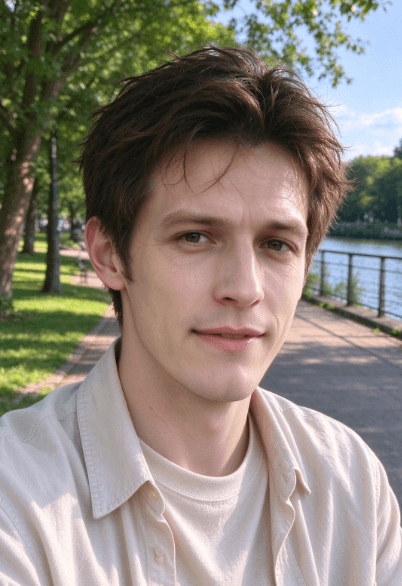
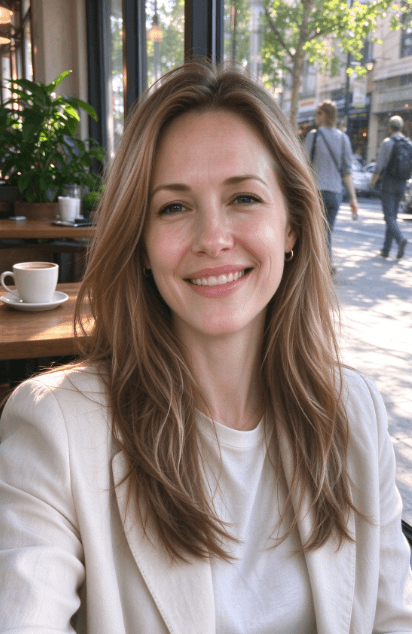
Upload one photo per person. The first portrait plays the zombie and the second the survivor, and the AI turns both into a single cinematic scene.
Reverse the order of the two portraits and the zombie role moves to the other person. Same two photos, a different story.
This landscape sample complements the portrait examples above. Choose 9:16 for a vertical clip or 16:9 for landscape viewing in the creator.
Upload your portraits, generate the video, then share the finished moment.
Choose one clear photo for each person and check the order of the roles.
Choose 9:16 or 16:9 and 10 or 15 seconds, pay $6.99 once, and wait usually 1–3 minutes. If a generation attempt fails, the order can retry without another charge.
Download the 480p MP4 with audio and no added watermark, then share it with your partner or social audience.
What a zombie couple video is, how to make one, what it costs, and what to expect from the finished clip.
28 questions
A short fictional romance between two people in a zombie apocalypse. One of them turns and walks out of the fog as an infected survivor while the other recognises them and opens their arms. It is a stylised scene built from your two faces, not a recording of anything real.
Upload one portrait per person, decide who plays the zombie and who plays the survivor, then pick a format and length and pay once. The generator uses a built-in zombie romance scene setup; custom prompts are not currently available. Generation usually takes 1 to 3 minutes and the result comes back to the page for preview and download.
A video editor starts from footage you already shot. Here you start from two photos and get a finished cinematic scene without a camera, a shoot, or any editing timeline. That suits anniversaries, proposals, and social posts where you want the moment, not the production. If you want to control framing and cut precisely, an editor is still the better tool.
One video costs $6.99 as a one-time Stripe payment. There is no subscription.
Free video generation is not available. Each video order costs $6.99 as a one-time payment, with no subscription or recurring charge.
Use two separate, clear, front-facing portraits with one person per image. JPG, PNG, and WEBP images are supported. Visible eyes, reasonably even lighting, and similar framing usually produce more consistent results. Group photos and collages are not recommended.
Yes. You can choose your portraits first, but you must sign in or create an account before checkout and generation can continue. The $6.99 payment is a one-time charge for one video order.
The product does not set a per-image size cap. Uploads are still subject to browser and connection limits. JPG, PNG, and WEBP portrait images are supported; if a large image fails to upload, try a smaller file or contact support.
Not yet. The current generator uses a built-in zombie romance scene setup, and users cannot edit its prompt or enter their own scene description. Customization may be considered for a future update; contact support@zombie-couple.video to share what you would like to control. A request does not guarantee a custom generation or a future feature.
Choose 9:16 or 16:9 and 10 or 15 seconds. The result is a 480p MP4 with audio and no added watermark.
The generated video is 480p MP4. The current creation flow does not offer a resolution selector or promise a higher-resolution export.
No. It creates one short AI-generated scene from two portraits using a built-in scene setup; it does not provide a traditional editing timeline for assembling footage or let you enter a custom prompt.
Separate portraits are recommended. Group photos, collages, and faces hidden by large accessories make it harder to keep the two people distinct.
The service creates your selected 10-second or 15-second video, usually within 1–3 minutes, and returns a preview with a temporary download link. Save the MP4 after it is ready; the generated video is retained for 7 days.
Yes. Preview the result first, then download the generated MP4 from the result area.
The current default model is Seedance 2 Mini (bytedance/seedance-2-mini). Users cannot select or switch models in the creation flow. Other providers or models may be used only if the service changes its generation configuration; we do not promise automatic failover to a different model. Contact support if you have a question about a specific order.
Two. The experience is designed around a couple, so each video uses one portrait per person to keep both characters clear.
One paid order includes up to three generation rounds in total, with up to two automatic attempts per round. After the first round, you can manually retry the same order up to two times without another charge, including with different portraits, roles, format, or duration. If all available attempts fail, you can request a refund or contact support.
Yes. A manual retry can use different portraits and can also change the role order, format, or duration without creating another charge. You can manually retry up to two times after the initial generation round. Custom prompts and scene descriptions are not currently supported.
Yes. If the available automatic and manual retry attempts still cannot produce a video, choose Request a refund on the result page to email support, or contact support@zombie-couple.video with your order details. Refund requests are reviewed and, if approved, returned through the original payment method. A successfully generated and delivered or downloaded video is not automatically refundable, except where required by law.
Only use images you own or have permission to transform. The tool is intended for creative projects, not for impersonation or misleading content.
No exact likeness is guaranteed. The video is a stylized AI interpretation of the portraits, and facial features, clothing, background, and other details may vary. Preview the result before sharing it.
No watermark is added to the finished file. What you preview is what you download.
Yes. The downloadable 480p MP4 includes audio. The current creation flow does not offer a separate audio-track or music selector.
You can use your generated video for personal and creative work. For commercial use, make sure you hold the rights to both source images and the final clip.
Generated videos are kept for 7 days. Download your MP4 during that window because the temporary result is then scheduled for deletion.
No. Your uploaded portraits and generated videos are processed to provide this service and are not used to train AI models.
Your uploads are used to build the scene and are not kept as a public gallery. Uploaded portraits and generated videos are automatically deleted 7 days after creation. Download the finished video and keep your own copy.
Upload two portraits and create a zombie love story in a few minutes.